

You paid for a website. It looks fine. But it brings in almost nothing from Google.
If you’ve searched for a small business SEO audit UK guide and come away more confused than when you started, you’re not alone. Most SEO advice online is written by SEO professionals for other SEO professionals. When a small business owner searches for help, they get buried under words like “canonicalisation,” “anchor text distribution,” and “E-E-A-T signals” and no idea what to actually do on Monday morning.
This guide is different. It’s the SEO audit process we actually use at Anchor Web Agency when a new client asks us to look at their site. It’s stripped down to the twelve checks that make the difference between ranking and not ranking for UK small businesses. Also, the eight things most guides tell you to worry about that you can safely ignore.
You can run this audit yourself in about few minutes, for free. By the end, you’ll know exactly why Google isn’t ranking you, what to fix first, and what to do about it.
💡 Quick option: If you’d rather skip the manual checks, run the free Anchor SEO Audit Tool — it runs all twelve checks automatically in about 60 seconds and gives you a PDF you can hand to your developer.
Why a Small Business SEO Audit UK Owners Can Actually Use Looks Different
Before we get into the checks, you need to know what not to waste your time on. Because nine out of ten SEO audit guides and most paid audits you’ll be offered — are built for mid-market companies with marketing teams, not for the sole trader or SME owner running everything themselves.
The problem is scope.
A generic “full SEO audit” produces 200-plus issues. Most of them don’t matter for a small business with 15 pages. You’ll spend three weeks fixing things nobody will notice, and the one thing that was actually holding you back, usually something small, like a broken sitemap or missing local schema, will still be broken at the end of it.
The 80/20 rule applies brutally to small business SEO.
About twelve things move the needle. Everything else is either a minor polish, a job for a technical SEO specialist working on enterprise sites, or — frankly — made up by agencies to justify their retainer.
This guide covers the twelve. If someone tries to sell you a £1,500 audit that checks 400 things, they’re either inexperienced, inflating the scope, or both.
What You’ll Need Before You Start
You can do this audit with four free tools, all of which take under five minutes to set up if you don’t have them already.
The four tools:
- Google Search Console — shows you what keywords your site already ranks for and flags crawl issues. Free. Set it up here.
- Google PageSpeed Insights — tests how fast your site loads on mobile and desktop. Free. No signup. Use it here.
- Your browser’s “View Page Source” — right-click your homepage, click “View Page Source.” You don’t need to understand the code. We’ll tell you what to search for.
- The Anchor Free SEO Audit Tool — runs most of this audit for you automatically if you’d rather not do it manually. Free. No signup.
Nothing else is required. Not Semrush. Not Ahrefs. Not a WordPress plugin. You might use those later as you grow, but you don’t need them today.
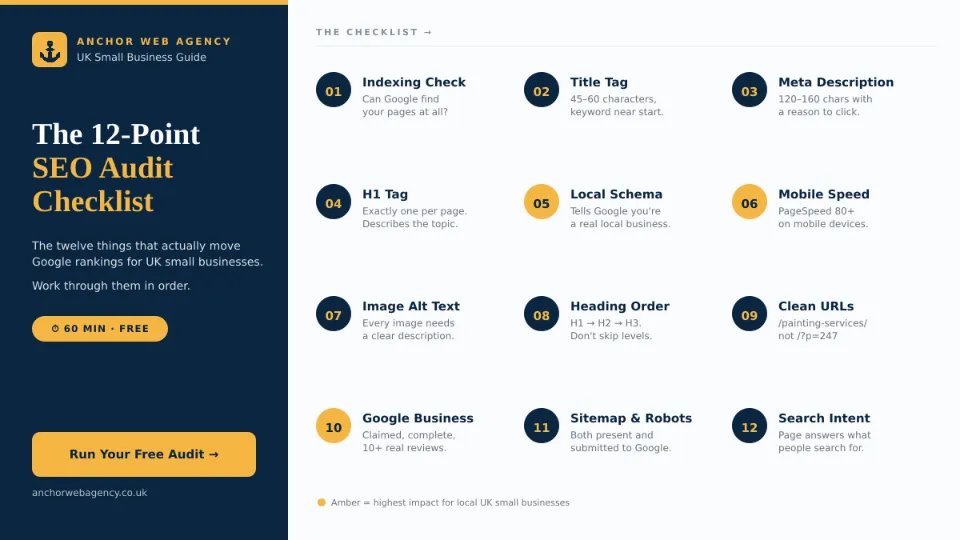
The Twelve Things That Actually Matter
Each one below tells you what it is, how to check it, what “bad” looks like, and how to fix it. Work through them in this order — the early ones are the highest-impact fixes.
1. Can Google Actually Find and Index Your Site?
This is the single biggest issue we see when small business owners come to us frustrated about rankings. Their site is live, but parts of it are accidentally hidden from Google.
How to check:
- Go to Google and type
site:yourwebsite.co.uk(use your actual domain). - Count roughly how many pages show up.
- Compare that number to how many pages you actually have.
What bad looks like: You have 20 pages on your site but Google shows 3. Or Google shows 400, when you have 15 (usually a sign of auto-generated tag or archive pages polluting the index).
How to fix it:
- Log into Google Search Console and go to “Pages” under the Indexing menu.
- Google will tell you exactly which pages it can’t index and why.
- The most common issues: accidental
noindextags (a plugin set this and nobody noticed), broken internal links, and missing sitemap submission. - Submit your sitemap (yoursite.co.uk/sitemap.xml or /sitemap_index.xml) to Search Console under Sitemaps.
2. Is Your Title Tag Doing Its Job?
The title tag is the blue link that appears in Google search results. It’s also what’s shown in browser tabs. It’s the single most important on-page SEO element, and it’s the one small business owners most often get wrong.
How to check:
- Open your homepage in a browser.
- Look at the text in the browser tab, or right-click → View Page Source and search for
<title>.
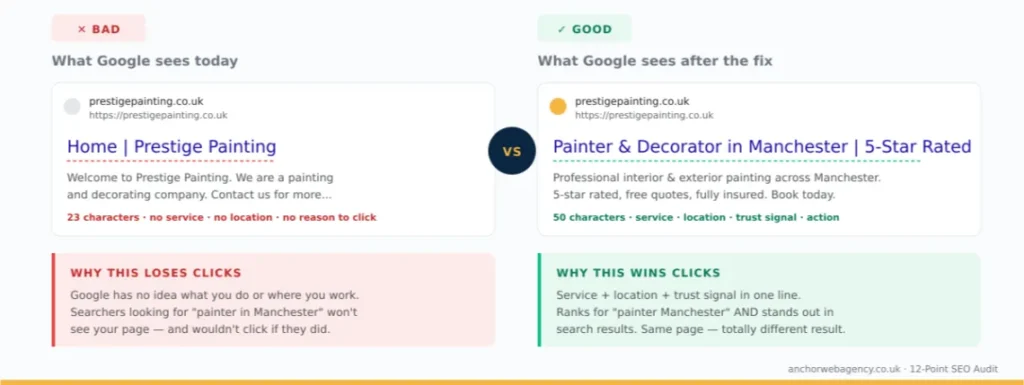
What bad looks like: Home|My Business or just your business name. This tells Google nothing about what you do or where you do it.
What good looks like: Painter & Decorator in Manchester | 5-Star Rated | Prestige — tells Google exactly what service you offer, where, and adds a trust signal.
How to fix it:
- Aim for 45–60 characters.
- Put your main service and location near the start.
- Make each page’s title unique. Never re-use the same one.
- If you’re on WordPress, edit the title in Yoast or Rank Math on each page.
3. Is Your Meta Description Pulling Its Weight?
The meta description is the grey text that appears under your title in search results. It doesn’t directly affect rankings — but it massively affects whether people click your result or your competitor’s.
How to check:
- Same as above — browser tab, or View Page Source and search for
meta name="description". - Compare it to what appears on Google when you search your business name.
What bad looks like: Missing entirely, or a one-line tagline that doesn’t mention what you actually do. When it’s missing, Google makes one up from your page content — and it usually picks something awful.
What good looks like: 120–160 characters, mentions your service, your location, and one specific reason to click (“free quote,” “same-day service,” “no call-out fee”).
How to fix it: Write one custom meta description for every important page. Front-load the benefit.
4. Do You Have One (Good) H1 Tag Per Page?
The H1 is the main heading of a page. Google uses it to confirm what the page is about. Two common mistakes kill rankings: having no H1 at all, or having three or four of them because your theme is badly built.
How to check:
- Right-click your homepage → View Page Source → press Ctrl+F → search for
<h1. - Count how many you find.
What bad looks like: Zero H1s, more than one H1, or an H1 that’s just your logo or business name.
How to fix it:
- Exactly one H1 per page.
- It should describe the page content, not just your brand name.
- On a homepage, something like “Premium Car Storage in Manchester” works better than “Pitstop 66.”
- On WordPress: if your theme is spitting out multiple H1s, that’s a theme-level problem — worth having a developer look.
5. Does Google Know You’re a Local Business? (Schema Markup)
This is the single most overlooked item on small business sites, and it’s the one with the biggest upside for anyone with a local or service-based business.
Schema markup is tiny bits of invisible code that tell Google “I’m a real business, here’s my address, phone number, and opening hours.” With it, you become eligible for the Google Map Pack, the business panel, and enhanced local listings.
How to check:
- Go to Google’s Rich Results Test.
- Paste your homepage URL.
- It will tell you what schema types are detected.
What bad looks like: No LocalBusiness schema. No Organization schema. The page just shows “No valid items found.”
How to fix it:
- If you’re on WordPress, Yoast Premium or Rank Math will add LocalBusiness schema automatically once you fill in your business details.
- At minimum you want:
OrganizationorLocalBusinessschema on every page,BreadcrumbListon internal pages, andFAQPageschema on any page with an FAQ section. - The Anchor SEO Audit Tool includes a full schema checklist that shows exactly which ones you have and which you’re missing.
6. How Fast Does Your Site Load on Mobile?
Over 60% of small business website traffic in the UK is mobile. Google ranks you based on the mobile version of your site. If it’s slow on mobile, you won’t rank — no matter how pretty the desktop design is.
How to check:
- Go to Google PageSpeed Insights.
- Paste your homepage URL.
- Wait 30 seconds. Look at the mobile score (not desktop).
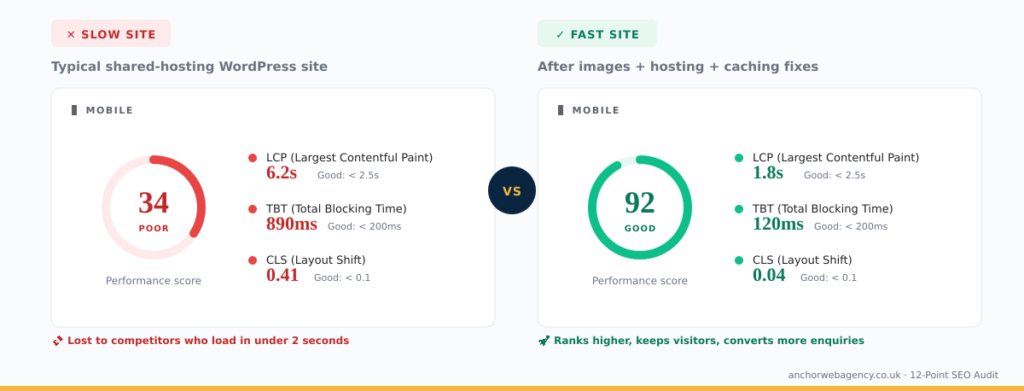
What bad looks like:
- Overall score under 50 (red zone).
- Largest Contentful Paint (LCP) over 4 seconds.
- Cumulative Layout Shift (CLS) over 0.25.
How to fix it (in rough order of impact):
- Compress your images. On WordPress, install Imagify or ShortPixel and convert to WebP. Most small business sites gain 20+ PageSpeed points from this alone.
- Add width and height attributes to images so the browser reserves space as they load. This fixes CLS issues.
- Remove plugins you aren’t using. Every active plugin adds weight.
- Pick a decent host. £3/month shared hosting is why your site is slow. Expect to pay £15–30/month for managed WordPress hosting that doesn’t drag you down.
7. Does Every Image Have Alt Text?
Alt text is a short description of each image. Google can’t “see” pictures — it reads the alt text to understand what the image shows. Missing alt text also fails accessibility standards, which matters both ethically and legally in the UK.
How to check:
- Right-click → View Page Source → press Ctrl+F → search for
alt=""(with nothing between the quotes). - Every one you find is a missing alt text.
What bad looks like: Most images have no alt attribute at all, or the alt is the file name (IMG_3421.jpg).
How to fix it:
- Write a short, natural sentence describing what’s in the image.
- Include your keyword where it makes sense — but never stuff keywords.
- For decorative images (dividers, background graphics), use
alt=""intentionally — that tells screen readers to skip it.
8. Is Your Heading Structure Logical?
Your page should read like a well-organised document: H1 for the main topic, H2s for major sections, H3s inside those. Many WordPress themes break this hierarchy — and when they do, Google struggles to understand your page structure.
How to check:
- Use a free Chrome extension like SEO Meta in 1 Click, or run your page through the Anchor SEO Audit Tool which shows your full heading tree.
What bad looks like:
- Three H1 tags on one page.
- Jumping from H2 straight to H4, skipping H3.
- Using
<h3>styling for visual reasons instead of document structure.
How to fix it: Rebuild the page’s headings so they follow a clean hierarchy. On WordPress, fix this in the page editor using proper heading blocks — not by changing font sizes.
9. Are Your URLs Human-Readable?
Compare these two:
- Bad:
yoursite.co.uk/?p=247 - Good:
yoursite.co.uk/painting-services-manchester/
How to check: Look at the URL of any service page. If it contains numbers, question marks, or gibberish, you have a problem.
How to fix it: On WordPress, go to Settings → Permalinks, and set it to “Post name.” Then fix existing URLs page by page (and set up 301 redirects from the old URLs — never skip this step).
10. Does Your Google Business Profile Actually Exist?
This isn’t technically a “website audit” item, but for any small business serving a local area, your Google Business Profile (formerly Google My Business) is as important as your website itself.
How to check:
- Google your business name + location (e.g. “Prestige Painting Manchester”).
- Look for the business panel on the right side of the search results.
What bad looks like: No panel at all, or an unclaimed listing showing incorrect hours, no photos, and zero reviews.
How to fix it:
- Claim your listing at google.com/business.
- Fill in every field. Add photos. Get at least 10 real reviews. Post updates monthly.
- Make sure your business name, address, and phone number (NAP) match exactly across your website, Google Business Profile, and any directory listings.
11. Do You Have a Sitemap and a robots.txt?
Two small technical files that help Google crawl your site.
How to check:
- Type
yoursite.co.uk/sitemap.xmlinto your browser. - Type
yoursite.co.uk/robots.txtinto your browser.
What bad looks like: 404 errors for either one.
How to fix it: On WordPress, Yoast and Rank Math both generate these automatically. If you’re getting 404s, the plugin needs activating or reconfiguring. Once done, submit the sitemap to Google Search Console.
12. Is Your Content Actually Answering What People Search For?
This is the one most guides skip — because it’s the hardest and the most valuable.
You can have every technical element perfect and still not rank, because your page doesn’t match what people are actually searching for.
How to check:
- Open Google Search Console → Performance report.
- Sort by “Impressions.”
- Look at the queries you’re getting impressions for but no clicks.
What bad looks like: You’re getting impressions for “what is car storage” but you run a business selling car storage. Your page is too sales-focused to rank for the informational query, and your SEO is all going to waste.
How to fix it: For every main page, ask: “What is the person searching for actually trying to know?” Then make sure the first 200 words of your page answer that question directly. Detailed product or service info can come below.
The Eight Things You Can (Mostly) Ignore as a Small Business
Here’s what you’ll see in generic audit guides that don’t really matter for most UK small businesses:
- Backlink disavow files — You almost certainly don’t have enough toxic backlinks to need one.
- Hreflang tags — Only matters if you have multiple language versions.
- AMP (Accelerated Mobile Pages) — Google stopped prioritising this in 2021.
- Keyword density percentages — Not a real ranking factor. Stop counting.
- Meta keywords tag — Google ignores it. Has done for over a decade.
- Exact-match domain name — Doesn’t boost rankings anymore.
- Changing your URL structure “for SEO” — If it’s already clean and indexed, leave it alone. Migrations break things.
- Chasing a perfect PageSpeed score of 100 — Aim for 80+. The effort to get from 85 to 100 is rarely worth it.
Focus on the twelve above. Ignore everything else unless an experienced SEO tells you specifically why it matters for your site.
What to Fix First, Second, and What to Leave for Later
If you’re short on time, do these first — all of them can be done in one afternoon:
Week 1 quick wins (high impact, low effort):
- Fix your title tag and meta description on the homepage and top 3 pages.
- Fill in missing alt text on every image.
- Claim / update your Google Business Profile.
- Install an SEO plugin (Yoast or Rank Math) and enable LocalBusiness schema.
Week 2 (moderate effort):
- Run PageSpeed Insights and compress your top 10 heaviest images.
- Submit your sitemap to Google Search Console.
- Check all your H1 tags are correct and unique.
Month 2+ (bigger project work):
- Rewrite thin pages that aren’t ranking well.
- Add FAQ sections with proper schema.
- Build out a local SEO content plan targeting your service areas.
If you don’t have time to do any of this yourself, that’s fine — that’s exactly what we do for our clients at Anchor Web Agency.
Should You Pay for a Professional SEO Audit?
Honest answer: not until you’ve done the free version first.
Most small businesses can identify and fix 80% of their SEO issues using the checks above and the free audit tool. Paying £500–£2,000 for a professional audit without first doing the basics is like paying a specialist consultant to tell you your tyres need air.
A professional audit only makes sense when:
- You’ve done the free checks and implemented the fixes.
- Your traffic has still not improved after 3–6 months.
- You’re a bigger site (50+ pages) where manual checks don’t scale.
- You’re in a highly competitive industry where the small details matter.
For everyone else, the free tools get you most of the way there.
Frequently Asked Questions
How long does an SEO audit take?
If you follow the twelve checks above, about 45–90 minutes for a small business website. The Anchor free SEO audit tool does most of it automatically in under 60 seconds.
How often should a small business do an SEO audit?
A light audit every three months is enough for most small businesses. After any major website change like a redesign, a platform migration, a plugin update that went wrong — do a full audit within a week.
What’s the difference between an SEO audit and an SEO strategy?
The audit identifies problems. The strategy decides which problems are worth fixing and in what order, based on your business goals. You need the audit first, then the strategy. Many agencies sell both but muddle them together.
What’s a “good” SEO score?
Any score above 80 on a free audit tool is healthy. Under 50 means you have serious issues. But the score itself is less important than the specific issues — fix the issues and the score takes care of itself.
How long before I see results from SEO fixes?
Technical fixes (title tags, schema, speed) often show results in 2–6 weeks. Content and authority improvements (new pages, backlinks, reviews) take 3–6 months. Anyone promising “page one in 30 days” is either lying or doing black-hat SEO that will eventually get you penalised.
Can I just hire someone to do this?
Yes — but ask them to walk you through exactly what they did, in plain English. If they can’t explain it, they either don’t understand it themselves or they’re hiding how little work they did.
Ready to See Where Your Site Actually Stands?
If you’d rather not go through all twelve checks manually, the Anchor Free SEO Audit Tool runs them for you in about 60 seconds.
You’ll get:
- Your overall SEO health score out of 100
- Full Core Web Vitals from Google
- Every technical issue, in plain English
- Every missing schema type
- Every image without alt text
- A downloadable PDF report you can share with your developer
No login. No email list. No sales call unless you want one.
About the Author
This guide was written by the team at Anchor Web Agency — a Birmingham-based digital agency helping UK small businesses grow through better websites, honest SEO, and lead generation that actually works. We’ve delivered SEO and web design for businesses across automotive, trades, care technology, and professional services, from Manchester to Belgium.
If you want a human to walk through your audit with you — no jargon, no sales pitch — Get a free quote for your website SEO today. We’re available 7 days a week.
📞 +44 7399 036995 ✉️ hello@anchorwebagency.co.uk